How long does a feature update take to install?
Feature updates can take up to 4-5 hours to completely install on a device. ITS will install feature updates overnight so there is no disruption to business hours.
Is there a way to opt out of feature updates?
No, except in the case of some specialized devices that run lab equipment. Feature updates ensure that computers at the university are kept secure, up-to-date, and supported. Without this, the personal information that FGCU faculty and professional staff work with on our computers could be at risk.
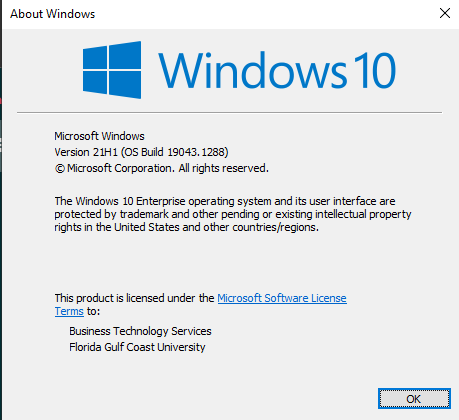
How do I know which version of Windows 10 I am running?
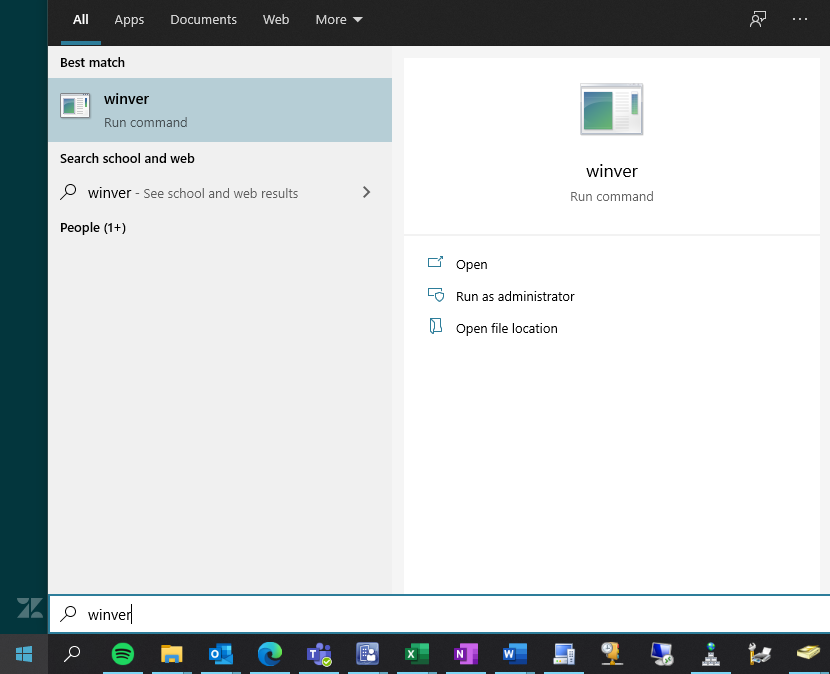
Click on the Start button, and in the search box, type winver. Press Enter on your Keyboard. The second line of the pop-up screen shows your Windows 10 version number.
What happens if an application I use no longer works after a feature update?
While this is almost always a rare case due to our extensive testing of all of the common university applications, do let the Help Desk know right away so we can look at compatibility options or possibly roll you back (if done within 7 days). You may also want to check with the software publisher to see if they have a new version that works with the latest feature update.
My taskbar customizations appear to be missing? Is there a way to get them back?
It is possible that some taskbar customizations may be reset after the Feature Update, especially if your computer was on an older release of Windows 10. You can customize it to your liking with the following steps:
-
Press and hold (or right-click) an app, and then select More > Pin to taskbar.
-
If the app is already open on the desktop, press and hold (or right-click) the app's taskbar button, and then select Pin to taskbar.
Note: To remove a pinned app from the taskbar, open the app's Jump List, and then select Unpin from taskbar.
What should I do if the Feature Update is stuck/not responding or can't install on my computer?
Please contact the University Help Desk at 239-590-1188 Monday-Friday from 7:30am to 10pm and Saturdays from 8am to 5pm or email us any time at helpdesk@fgcu.edu
You may be asked to provide a picture or detailed information as to where your computer is in the process for appropriate next steps.